

Graphiti Integration
Overview
Section titled “Overview”Graphiti is an open-source framework that transforms text, JSON, and chat content into queryable knowledge graphs using language models and graph databases. It excels at:
- Semantic indexing and retrieval
- Contextual search across structured/unstructured data
- Building long-term memory for AI agents
Why use Graphiti with Relax AI? Combine Neo4j’s graph capabilities with Relax’s powerful LLMs for context-aware applications.
Key Features
Section titled “Key Features”- Multi-format Ingestion: Process text, JSON, and chat messages
- Hybrid Search: Combine vector similarity and graph traversal
- Relax AI Integration: Use any Relax AI model for embeddings and reasoning
- Neo4j Backend: Lever industry-leading graph database
- Memory API: Create persistent knowledge for AI agents
Use Cases
Section titled “Use Cases”- Building corporate knowledge graphs from documents and chats
- Creating contextual memory systems for AI copilots
- Real-time reasoning over dynamic data streams
- Customer support history analysis and retrieval
- Integrating Slack/PDF data into queryable knowledge
Quick Setup
Section titled “Quick Setup”-
Install Graphiti Core
Terminal window pip install graphiti-core openai -
Set up Neo4j database
Graphiti requires Neo4j version 5.26 or higher. Either download and install Neo4j Desktop. Create a project, add a new database (Local DBMS), set password for user neo4j, and start the database or start a docker container with the following command:
Terminal window docker run \--name neo4j-graphiti \-p 7474:7474 -p 7687:7687 \-e NEO4J_AUTH=neo4j/your_password \-e NEO4J_PLUGINS='["apoc"]' \neo4j:5.26-communityThis exposes the HTTP (7474) and Bolt (7687) ports with neo4j/your_password credentials.
-
Set required environment variables
Can be in
.envfile:Terminal window export NEO4J_URI="bolt://localhost:7687"export NEO4J_USER="neo4j"export NEO4J_PASSWORD="your-password"export OPENAI_API_KEY="rak_..." # Replace with your Relax AI API keyexport OPENAI_BASE_URL="https://api.relax.ai/v1" -
Initialize the Neo4j database schema
Run the below sample script to create the schema:
db_schema.py import osimport asynciofrom graphiti_core import Graphitiasync def main():graphiti = Graphiti(os.getenv("NEO4J_URI"),os.getenv("NEO4J_USER"),os.getenv("NEO4J_PASSWORD"))await graphiti.build_indices_and_constraints(delete_existing=True)print("✅ Neo4j schema initialized")await graphiti.close()if __name__ == "__main__":asyncio.run(main()) -
Configure Graphiti with RelaxAI client
Now configure Graphiti with RelaxAI client along with a sample python example below.
import os, asyncio, jsonfrom graphiti_core import Graphitifrom graphiti_core.llm_client import LLMConfig, OpenAIClientfrom graphiti_core.embedder.openai import OpenAIEmbedder, OpenAIEmbedderConfigfrom graphiti_core.nodes import EpisodeTypefrom datetime import datetime, timezone
# LLM & Embedder setupllm_config = LLMConfig(model="GLM-46", small_model="Llama-4-Maverick-17B-128E")llm_client = OpenAIClient(llm_config, None)embedder = OpenAIEmbedder(OpenAIEmbedderConfig(embedding_model="Mistral-7b-embedding"), None)
async def main():    graphiti = Graphiti(        os.getenv("NEO4J_URI"),        os.getenv("NEO4J_USER"),        os.getenv("NEO4J_PASSWORD"),        llm_client=llm_client,        embedder=embedder    )
    await graphiti.build_indices_and_constraints(delete_existing=True)    print("✅ Schema built")
    # episodes    episodes = [        {            "name": "acquisition-news",            "body": (                "In April 2025, Acme Corp acquired BetaTech for $25M. "                "Jane Doe, VP of Strategy at Acme, will lead integration."            ),            "source": EpisodeType.text,            "description": "Corporate acquisition announcement",            "time": datetime(2025, 4, 1, tzinfo=timezone.utc)        },        {            "name": "customer-support-chat",            "body": (                "Customer: I've been using your mobile app since last year, and the notifications aren't working.\n"                "Support: Hi! We rolled out a fix in March 2025. Please update the app."            ),            "source": EpisodeType.message,            "description": "Customer support chat",            "time": datetime(2025, 4, 5, tzinfo=timezone.utc)        },        {            "name": "product-release",            "body": json.dumps({                "product_id": "P-100",                "name": "EcoSmart Thermostat",                "manufacturer": "HomeTech Inc",                "price": 199.99,                "release_date": "2025-03-20T10:00:00Z",                "features": ["Remote control", "Energy saving mode", "Voice integration"]            }),            "source": EpisodeType.json,            "description": "Product catalog entry",            "time": datetime(2025, 3, 20, tzinfo=timezone.utc)        }    ]
    for ep in episodes:        await graphiti.add_episode(            name=ep["name"],            episode_body=ep["body"],            source=ep["source"],            source_description=ep["description"],            reference_time=ep["time"]        )        print(f"✅ Added episode: {ep['name']}")
    # Sample search    results = await graphiti.search("Who did Acme Corp acquire?")    print("Search results:", results)
    await graphiti.close()
if __name__ == "__main__":    asyncio.run(main())
Advanced Usage
Section titled “Advanced Usage”Namespaces (group_id)
Section titled “Namespaces (group_id)”You can assign a group_id when initializing Graphiti to separate memory graphs by application, tenant, or agent.
graphiti = Graphiti( uri, user, password, llm_client=llm_client, embedder=embedder, group_id="team-42")Hybrid Search
Section titled “Hybrid Search”By default, graphiti.search() uses vector similarity + graph traversal. You can override search strategies, weights, or filter by time, entity type, or tag.
Graph Queries (Cypher)
Section titled “Graph Queries (Cypher)”Use Neo4j Browser or Bloom to run the following queries:
// Get all people involved in launchesMATCH (e:Event)<-[:INVOLVED_IN]-(p:Entity)WHERE e.name CONTAINS 'launch'RETURN p.name, e.date
// Find related support ticketsMATCH (t:Ticket)-[r:RELATED_TO]->(p:Product)RETURN t, p, r
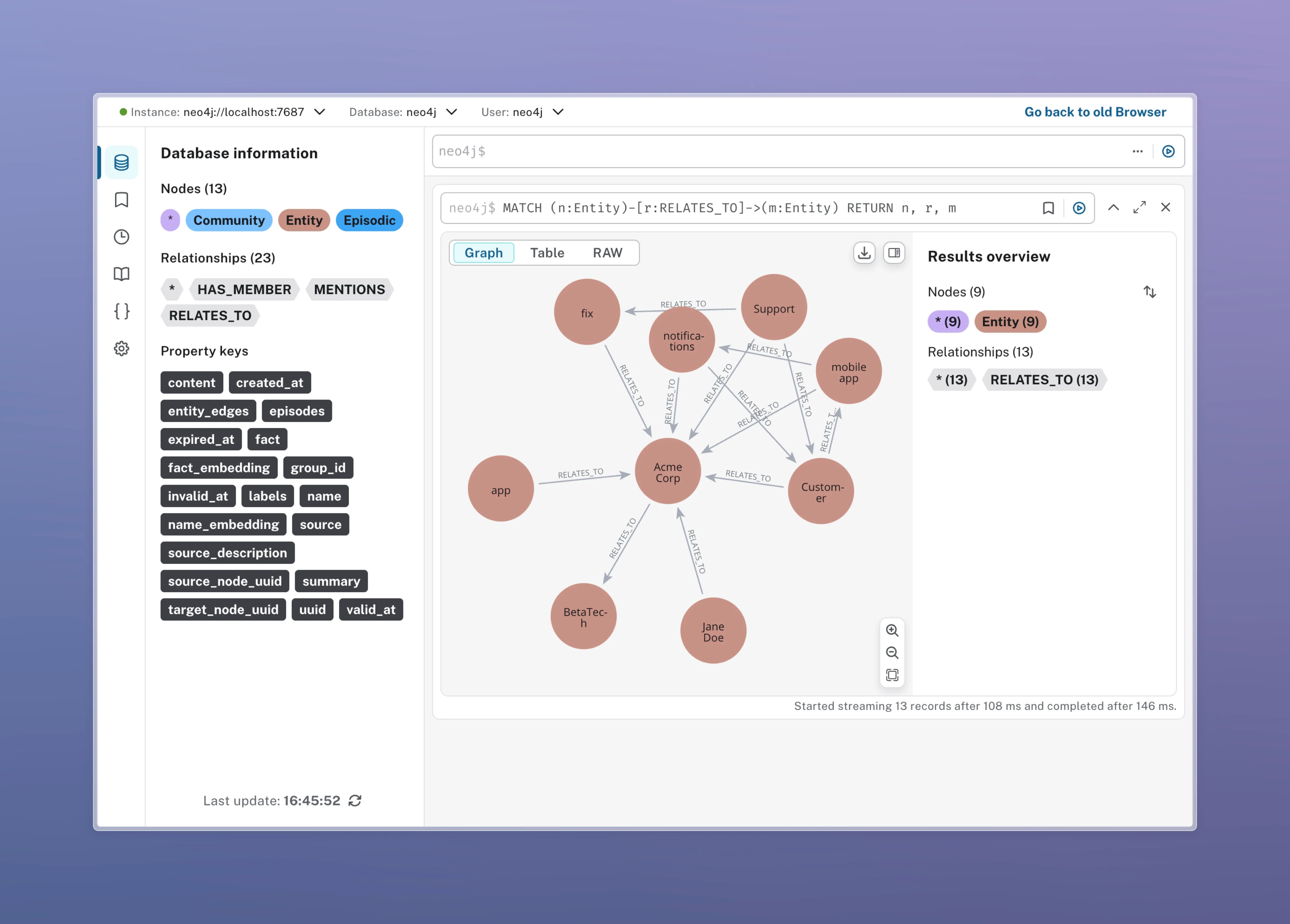
You should see graph nodes representing entities, events, and relationships in the Neo4j Browser.
Troubleshooting
Section titled “Troubleshooting”- Connection Issues: Verify Neo4j is running and credentials are correct
- Schema Errors: Run
build_indices_and_constraints(delete_existing=True) - Model Compatibility: Ensure Relax AI model names match available models